Strict app blocker for iPhone
Lock the apps. Keep the key far away.
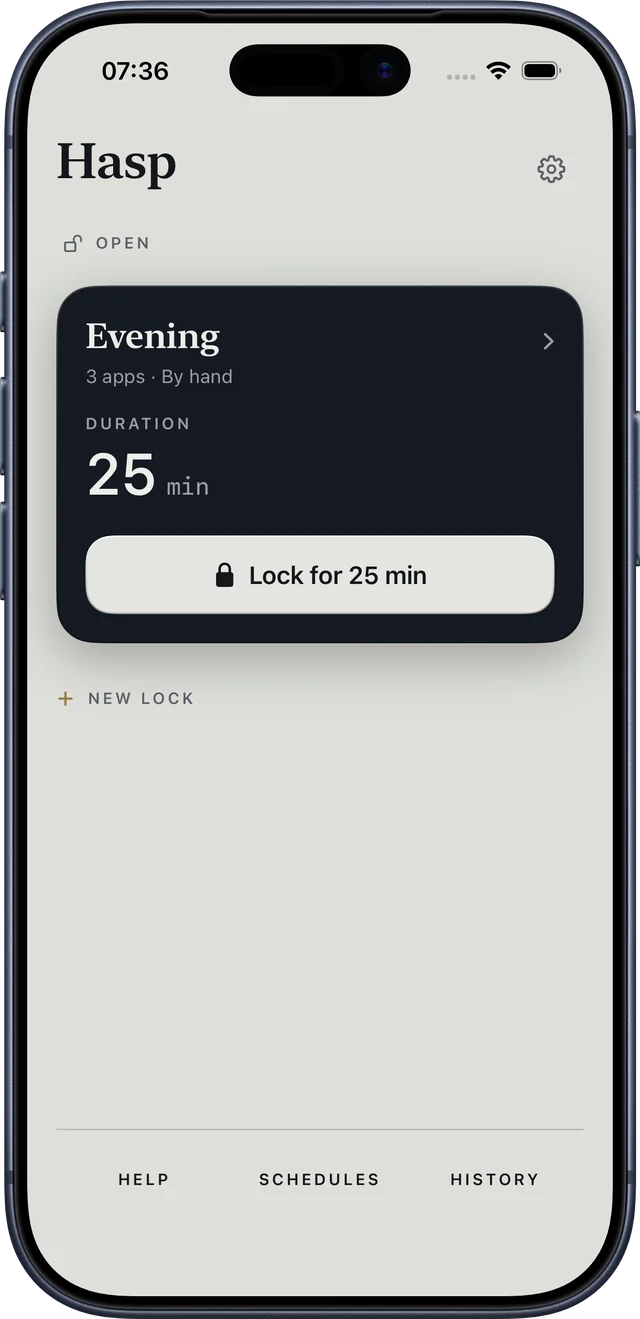
Lock apps by hand, on a schedule, or after a daily limit. Commitment Mode has no quick End button, and your NFC key or QR can live in another room.
The timer and the free emergency exit always stay. Blocking is free; Hasp Lifetime is a one-time purchase — no subscription.
How it works
Three decisions, then the phone stops negotiating.
- 01
Choose the apps
Any number of them, free. iOS hides their names even from Hasp.
- 02
Decide when it locks
By hand for a set time, after a daily limit, or on a schedule.
- 03
Add a key, if you want one
An NFC sticker on the fridge, a card you already carry, or a printed QR. It starts and ends a lock — keep it somewhere you have to walk to.
Commitment Mode
For the evenings when a button is too easy.
Commitment Mode removes the quick End button. Your first Commitment lock is free, up to 25 minutes.
- No End button in Hasp while it runs.
- No deleting apps until it ends. You can also turn this on for every lock in Settings, free.
- It ends by the timer, at your key, or through the free emergency exit after a 10‑minute wait.
The honest part
What Hasp can’t do.
iOS lets the owner of a phone switch off Screen Time access in Settings, and every lock lifts the moment they do. Apple gives no way to prevent that on an adult’s own device.
So Hasp doesn’t pretend. It removes the impulsive exits — the quick button, the deleted app — and leaves you a free, visible way out that takes ten minutes.
Price
Free to block. Pay once for more.
Free
forever
- Lock any number of apps, for any length from 15 minutes
- Timers, a daily limit and repeating schedules
- One lock with its own key
- The emergency exit, always
- One Commitment lock to try
Hasp Lifetime
one purchase · nothing renews
- Commitment Mode without limits
- Several locks, each with its own key
- Your full history, week by week
Guides
Blocking apps on iPhone, explained plainly.
How to block apps on iPhone — and make it stick
Screen Time, Downtime and blocker apps compared — and why the way a lock ends matters most.
NFC app blocker: lock your phone with a $1 sticker
Why a sticker on the fridge beats willpower, which NFC tags work with iPhone, and where to put yours.
Why Screen Time limits don’t stop you (and what does)
A limit that ends with “Ignore” is a reminder. What makes a lock hold is friction you can’t skip on impulse.
An app blocker without a subscription
What Apple requires app blockers to give away, what’s worth paying for, and why once is enough.
Privacy
Nothing to sign up for.
No account
No email, no login, no sync. Your app choices, keys and lock history stay on your iPhone.
App names never reach us
iOS hands Hasp anonymous tokens instead of app names. Your keys and scans stay on the phone.
Anonymous events, with a switch
With analytics on, Hasp sends usage events tied to a random install ID — not to your Apple ID. Turn them off in Settings.